




Agentic Coding: AI Support for Angular
Software projects are becoming more complex, and requirements are increasing. AI (Artificial Intelligence) tools can support us in development and provide relief: They help with generating code, explain complex relationships and suggest improvements. In this article, we show you how to generate the best possible code using Angular's AI tools.
🇩🇪 This article is available in German language here: Agentic Coding: AI-Unterstützung für Angular
Contents
- What are AI Agents?
- Challenge: Outdated Knowledge
- AI Configuration Files
- Challenge: The Context Window
- Angular's MCP Server
- Practical Recommendations
- Conclusion
What are AI Agents?
Agentic Coding is the next step after ChatGPT: Forget copy-paste from the browser. AI agents work directly in your project – they read code, write files, run tests and autonomously plan next steps. You set the direction, the agent executes.
AI found its way into everyday life through browser-based chats like ChatGPT, Gemini or Perplexity. But anyone developing software with them quickly hits limitations: The chat doesn't know the project, and code must be manually copied back and forth. AI agents solve this problem. They can essentially do anything we could do on a computer. The agents typically run in a sandbox and ask for confirmation before critical actions.
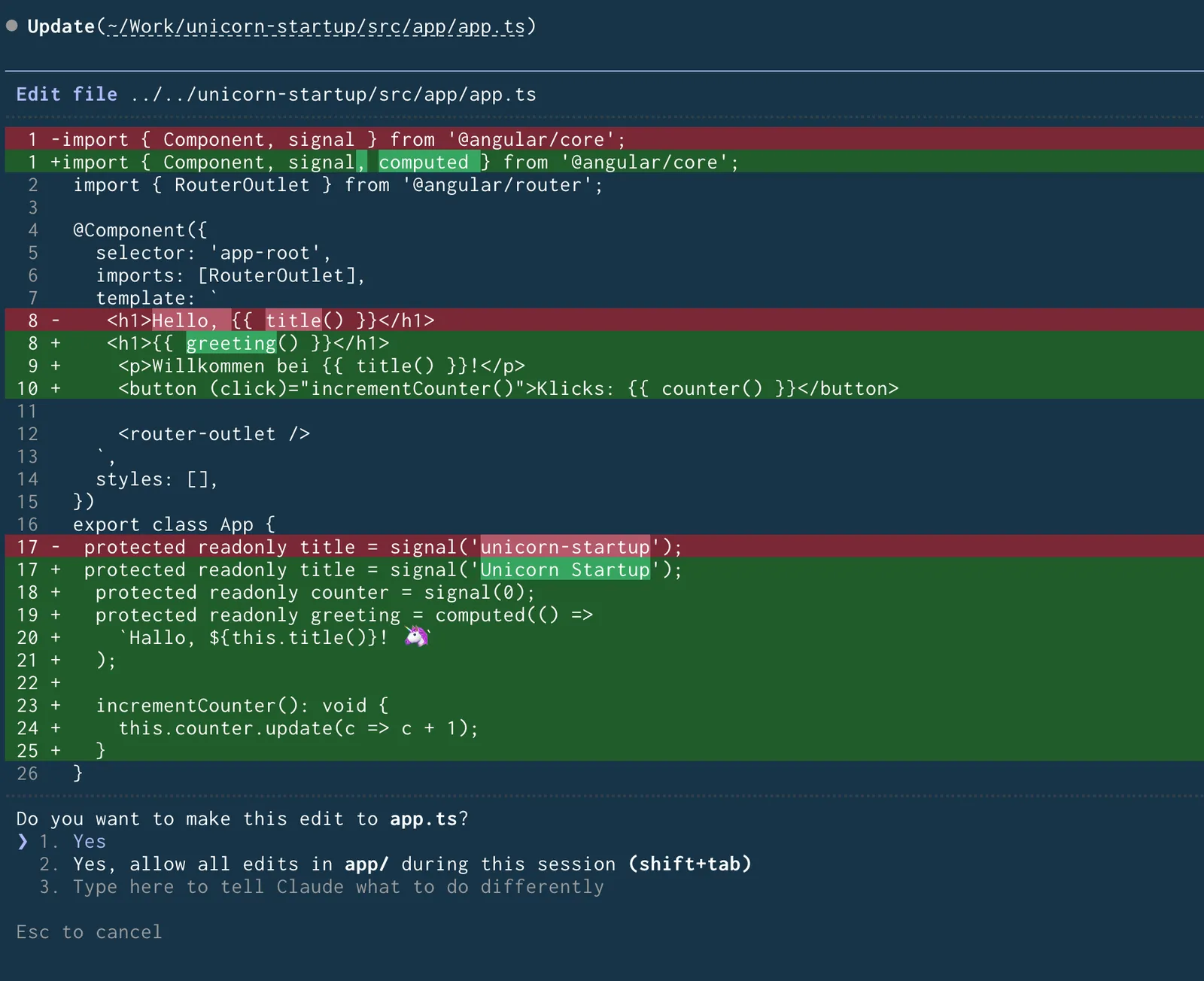
Angular provides special support for working with such agents, so that we get optimal results and the generated code follows current best practices. Before we go into detail, however, we should discuss why this support is even necessary.
Challenge: Outdated Knowledge
The technical foundation of all AI agents is an LLM (Large Language Model). It is based on training data that was created at a specific point in time. Since such training is extremely resource-intensive, it is not performed continuously. So there is practically a cutoff date, and even the best models can only "know" what existed up to that date.
This becomes problematic with fast-moving technologies like Angular: New features are added and best practices change.
Recent innovations like Signal Forms, the Resource API or Angular Aria may not be present in the training data.
Older concepts like the module system (NgModule) or the structural directives (NgIf and NgFor) are, however, well known to the model.
Considering also that older concepts have accumulated more documentation, tutorials and code examples over the years, it is statistically more likely that the model will suggest these.
For maintaining existing legacy projects, this is an advantage.
But if you aim for a modern application with current best practices, the model is more likely to provide older solutions.
In the worst case, the model mixes old and new concepts or hallucinates, i.e. it generates plausible-sounding but factually incorrect statements.
The result is inconsistent or non-functional code.
The solution lies in providing the AI agent with the necessary context. Angular offers two tools for this:
- Configuration files for instructions and examples
- MCP server for Angular-specific information (and tools)
AI Configuration Files
At the start of their work, AI agents need as much good information as possible. This is also referred to as context. The vendor has already provided basic rules and instructions, the so-called System Prompt. But this is usually not enough: The agent has no knowledge yet about the specific project for which it should perform work.
This is where project-specific configuration files come into play.
Most AI agents look for such files with a specific name: Claude Code expects .claude/CLAUDE.md, Cursor uses .cursorrules, GitHub Copilot uses .github/copilot-instructions.md and so on.
Each vendor has their own standard, but the generic filename AGENTS.md could establish itself as a cross-vendor standard.
These files contain a collection of rules and best practices for the respective project.
This is called a Custom Prompt: a file with project-specific instructions that controls the behavior of the AI agent and supplements the System Prompt.
You could also enter these inputs manually before each conversation, but that would be tedious and easy to forget.
Since no unified standard for the filename has been established yet, the Angular CLI supports various variants.
It asks which agent is being used when creating an application and generates the appropriate files.
We can also specify the configuration directly with the --ai-config option:
ng new my-app --ai-config=agents
If we initially decided against an explicit configuration or want to add another one, we can generate such a configuration afterwards:
ng g ai-config
The guidelines include best practices for TypeScript and Angular, specifications for components, state management, templates and services, as well as accessibility requirements.
The agent now has instructions. But whether it can implement them correctly depends on its knowledge level. The Custom Prompt states, for example, that the new syntax for control flow should be used. But how should the model know how this works if it didn't exist at the time of training?
Here we can partially help: The file generated by Angular is a good starting point, but we can extend it. Useful are concrete examples for new syntax, project-specific conventions or hints about errors the agent has repeatedly made. For the Custom Prompt: keep it short and focused. Too many instructions dilute the effect. The AI agent can actually help formulate good instructions itself. The MCP server, which we will introduce later, can also provide missing information.
However, there is a limitation: Every LLM can only process a limited amount of text at once. This is called a context window. The Custom Prompt sits in this window, and during longer sessions the instructions can be forgotten.
Challenge: The Context Window
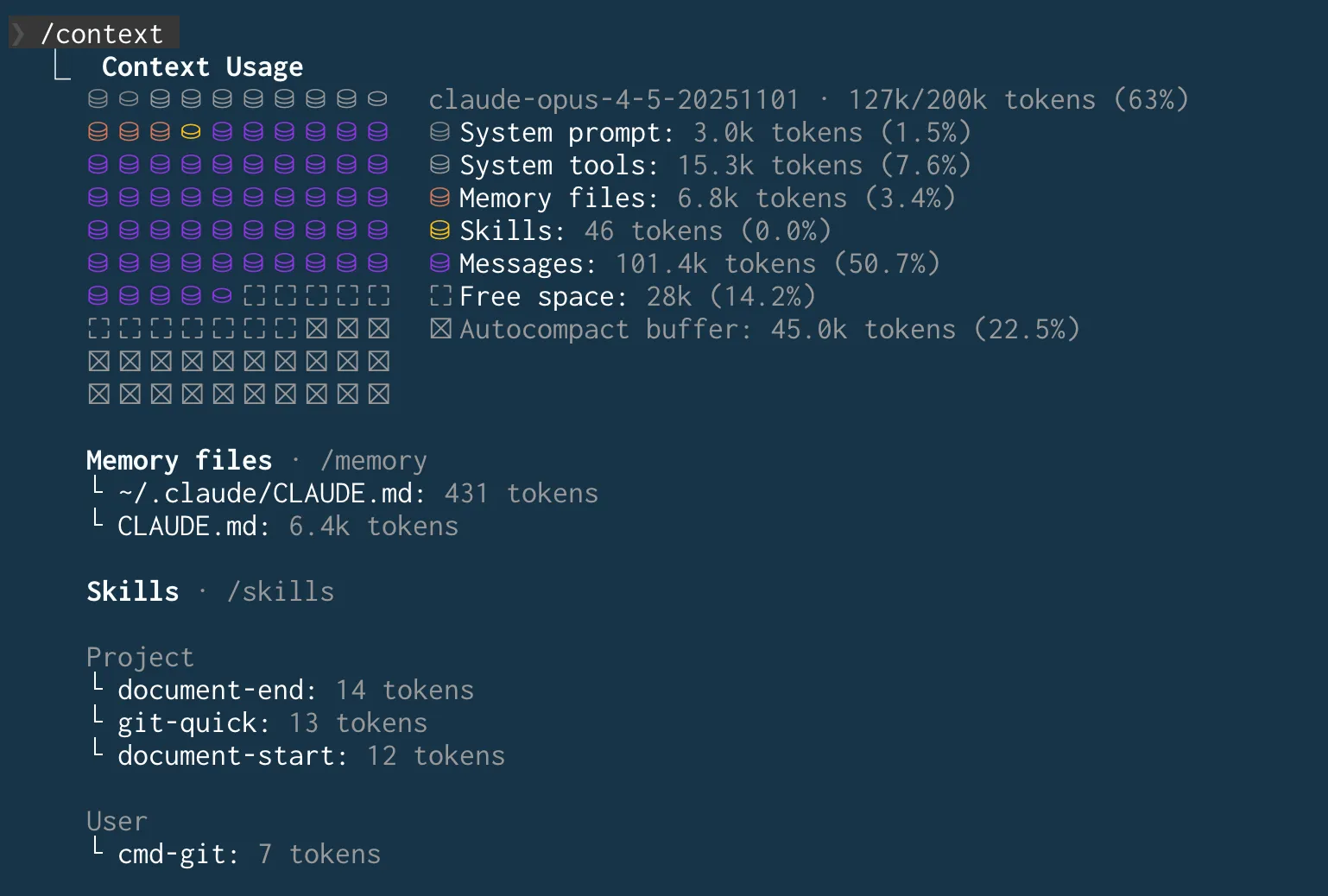
When the context window is exceeded, the AI agent "forgets" earlier parts of the conversation. This forgetting is technically necessary for the conversation to continue. The most common approach is to summarize the previous conversation as best as possible (Context Summarization). This works wonderfully sometimes and unfortunately not at all other times. If the summary has removed important aspects, this leads to inconsistent responses or outdated code suggestions.
Related to this is the Lost-in-the-Middle effect: Information in the middle of a very long context is given less weight by the model than information at the beginning or end. This can cause initial instructions from Custom Prompts to be neglected as the conversation progresses, and the model falls back only to the original System Prompt. The longer the session lasts, the more likely such effects become. Modern AI agents use additional strategies beyond summarization, e.g. targeted tool calls or sub-agents with their own context window. A particularly elegant solution is offered by the Angular CLI's MCP server.
Angular's MCP Server
MCP (Model Context Protocol) is an open standard that enables connections between AI applications and external systems. MCP servers can provide resources (data sources), tools (callable functions) and prompts (predefined instructions). The Angular team is very active in this new field and provides an integrated MCP server through the Angular CLI.
Why does this help? MCP tools are called fresh on demand. The information then lands in the context. If it is lost through summarization, it can be retrieved again at any time. Additionally, the Angular team maintains the responses and updates them regularly, so the problem of outdated knowledge is also addressed. Angular's MCP server provides various tools.
Tools Overview
Standard Tools:
get_best_practices: provides coding guidelines for modern Angular development.search_documentation: searches the official Angular documentation version-specifically based on keywords.find_examples: provides code examples for modern Angular features from a curated database.ai_tutor: starts an interactive Angular course that guides you step by step through the framework.list_projects: identifies applications and libraries in the workspace.onpush_zoneless_migration: analyzes code and provides instructions for migrating to OnPush change detection.
Experimental Tools:
modernize: supports migrations to modern patterns, e.g. Signal Inputs (@Input→input()), modern Outputs (@Output→output()), theinject()function, Signal Queries (ViewChild/ContentChild→ Signals), Built-in Control Flow (*ngIf/*ngFor→@if/@for) and Self-Closing Tags.build: performs a one-time build withng build.devserver.start,devserver.stop,devserver.wait_for_build: manage the Development Server.e2e: runs End-to-End tests.test: runs Unit tests.
Since the Angular team has a strong focus on AI, more tools will likely be added regularly.
Setting up the MCP Server
For the AI agent to use the MCP server, we need to configure it once.
The command ng mcp displays a generic configuration example for this:
$ ng mcp

To start using the Angular CLI MCP Server, add this
configuration to your host:

{
    "mcpServers": {
        "angular-cli": {
            "command": "npx",
            "args": ["-y", "@angular/cli", "mcp"]
        }
    }
}

Exact configuration may differ depending on the host.

For more information and documentation, visit:
https://angular.dev/ai/mcp
The -y flag in the npx command installs the Angular CLI without prompting if it is not present.
The ng mcp command only outputs setup guidance in the terminal.
The exact configuration differs depending on the agent. Typical configuration files are mcp.json or settings.json.
The Angular documentation contains instructions for various agents.
Enabling Experimental Tools
The experimental tools are disabled by default.
To use them, they must be explicitly enabled with the --experimental-tool flag (short: -E).
The standard tools remain available – the experimental tools are added, not replaced.
Enable individual tools:
{
    "mcpServers": {
        "angular-cli": {
            "command": "npx",
            "args": ["-y", "@angular/cli", "mcp", "-E", "modernize", "-E", "test"]
        }
    }
}
Enable all experimental tools at once:
{
    "mcpServers": {
        "angular-cli": {
            "command": "npx",
            "args": ["-y", "@angular/cli", "mcp", "-E", "all"]
        }
    }
}
There is also the devserver group, which only enables the devserver tools (devserver.start, devserver.stop, devserver.wait_for_build).
Additionally, two more options are available:
--read-only: enables only read-only tools that don't modify files.--local-only: enables only tools that don't require internet access.
Once the MCP server is configured, the AI agent decides autonomously when to call which tool.
The MCP server does not run permanently, but is only started on demand and then stopped again.
Most tools are read-only: They provide information like documentation, examples or best practices without modifying files.
Some tools like modernize can, however, also call Angular CLI generators and thus modify code in the project.
If you want to use a specific tool, explicitly ask the agent for it, e.g. with "Use the search_documentation tool to search for Signal Forms".
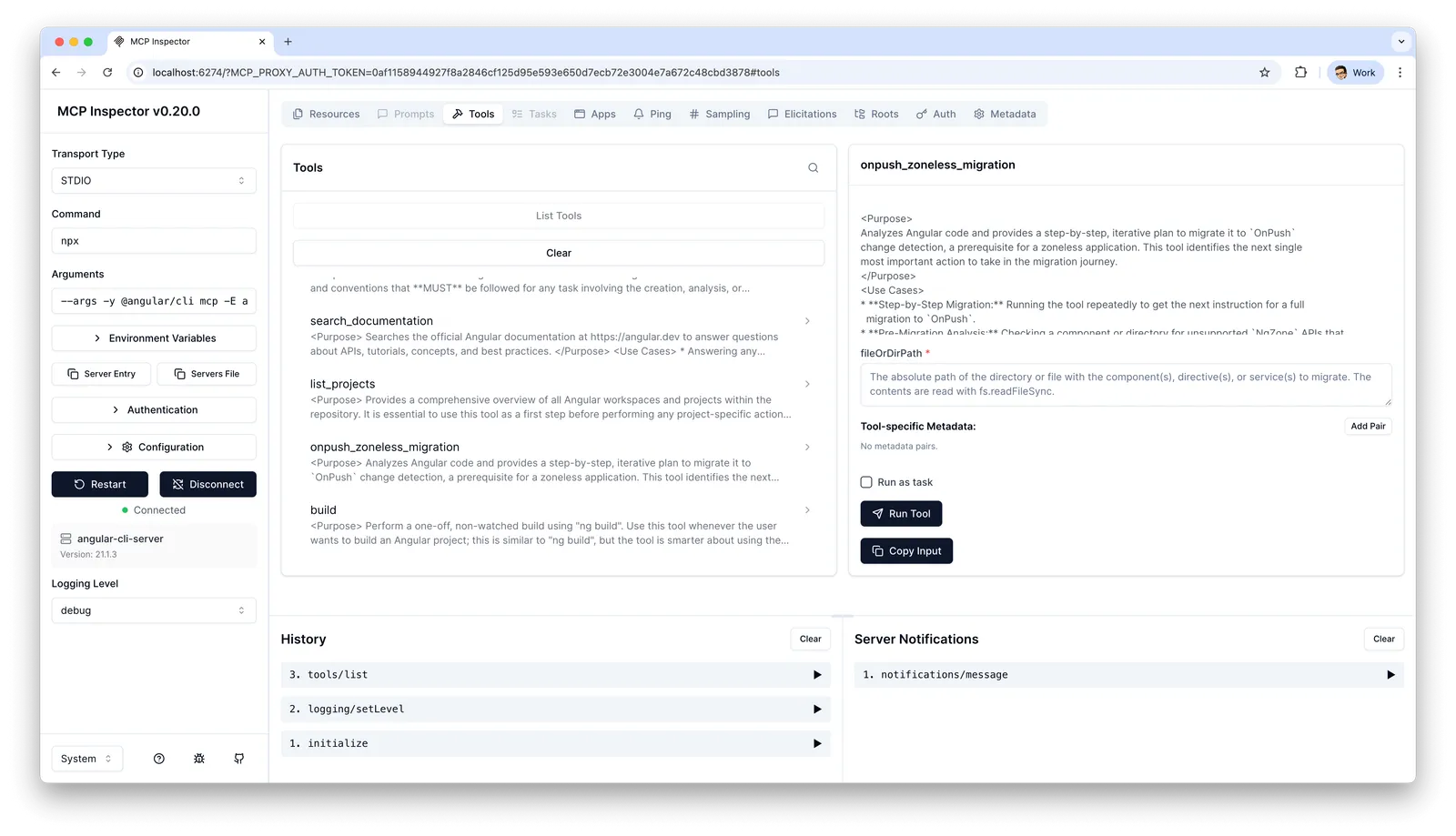
If you're curious, you can explore the Angular CLI's MCP server yourself. With the MCP Inspector tool, you can view and test all available tools in the web browser:
npx @modelcontextprotocol/inspector "npx" --args "-y @angular/cli mcp"
Practical Recommendations
Working with AI agents has a learning curve. Initially it requires effort to formulate good prompts, provide the right context and maintain the setup. But those who give this phase time can achieve significant relief in their daily work. The following tips for daily work help to shorten this learning curve:
- Provide context: Give the agent the context it needs for the current task, and be careful not to flood the context excessively with irrelevant information. Reference existing files, interfaces or conventions in your project. Use the MCP server to query Angular-specific best practices.
- Work iteratively: Don't expect the first result to be perfect. Break complex tasks into small steps and refine the result gradually. Ask the agent to review the created software itself and find errors. Have it check whether the code conforms to the Angular style guide.
- Prefer simplicity: AI agents produce better results with clear, simple structures – just like humans do. Instead of designing complex architectures, use proven abstractions like the Resource API. Simple code is easier to generate, review and maintain.
- Let it generate tests: Have unit and integration tests generated, possibly also E2E tests.
Creating
TestBedconfigurations and mocks is a strength of AI agents. You get quick feedback on whether something works as intended, and can work together with the agent on a good solution. - Keep code reviews: Generated code should go through the same review process as manually written code. Pay special attention to modern Angular patterns like Signals and the new Control Flow.
- Have errors explained: When an error occurs, let the agent analyze the error message and make solution suggestions. You save yourself the research and get context-specific help.
- Review critically: AI models tend, in our experience, to take shortcuts.
Typical examples are the
anytype as a lazy solution instead of correct typing, or weak assertions liketoBeTruthy()instead oftoEqual({ name: 'Test' })ortoBeGreaterThan(0)instead oftoBe(42). Pay special attention to ensure the AI doesn't simply adjust the test when tests fail, instead of solving the actual problem. Therefore, always review generated code critically and demand strict typing. - Use recipes: Countless implementation patterns from the training data are stored in the LLM. Describe what you need and have solution suggestions generated. Always ask for possible alternatives too, and have pros and cons listed.
- Delegate migrations: For Angular upgrades or migration to new patterns like Standalone Components, Signals or Control Flow, the agent can take over a lot of work. The MCP server provides dedicated tools for this.
- Pair Programming: Use the agent as a "sparring partner" for architectural decisions. Have different solution paths shown to you. The agent has no ego and explains patiently.
- Use CLIs instead of Web: AI agents are increasingly receiving access blocks because they crawl websites intensively.
Therefore use designated interfaces: for GitHub the GitHub CLI (
gh), for Azure DevOps the Azure CLI (az devops) or provided MCP servers. Command-line tools offer a more direct interface than web interfaces and consume less API quota, which saves costs. - Additional MCP servers: Connect additional MCP servers to your agent. Many tools from everyday development offer suitable integrations. By connecting to your design software, ticket systems and other platforms, the agent can directly access documentation, designs and tickets and incorporate this information into its work.
Conclusion
AI agents are powerful tools that support us in developing with Angular. With configuration files and the Angular CLI's MCP server, you bridge the gap between outdated training data and current best practices. But AI does not replace expertise. Those who don't understand Angular's concepts cannot judge whether the generated code is correct. Therefore: Use AI as an accelerator, but invest in your own understanding – for example in our Angular workshops.
Header image: generated with Nano Banana Pro (Gemini 3)
Keywords:AngularAIArtificial IntelligenceAI AgentAI-AgentMCPModel Context ProtocolMCP ServerVibe CodingAgentic CodingLLM
Anregungen? Feedback? Fehler?
About the Angular book
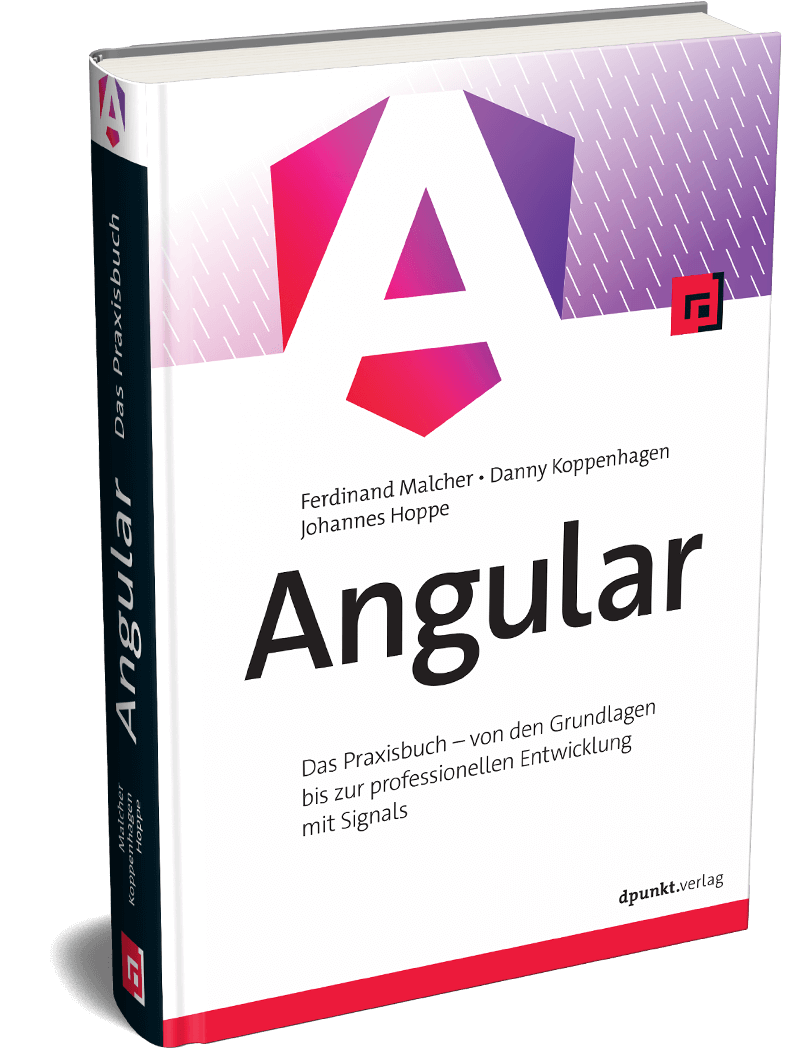 This article is an excerpt from the new Angular book (in German language) by Ferdinand Malcher, Danny Koppenhagen and Johannes Hoppe. After four successful editions, we have rewritten the book from scratch – with modern syntax, compact and covering many new topics. The new book is out now. More info at angular-buch.com
About our Angular workshops
 Want to try AI-powered Angular development hands-on? Join Ferdinand Malcher and Johannes Hoppe in our workshops, where you learn Angular the practical way – including modern AI tools for more efficient development. More at angular.schule