


Claude Code: How to Actually Fix the Endless Scrolling Problem
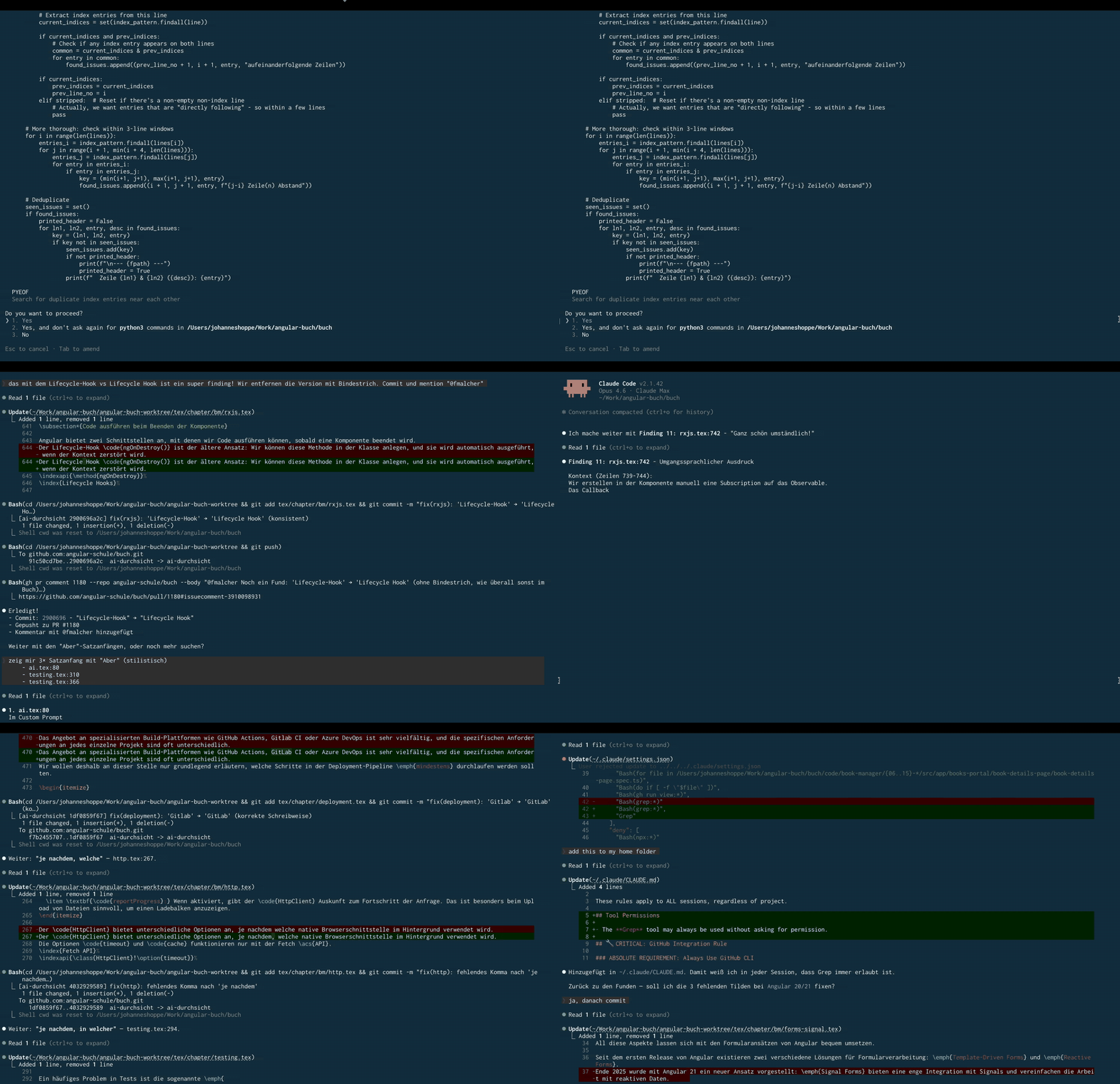
Claude Code has a notorious bug: the terminal scrolls uncontrollably, flickers, or freezes entirely. Since March 2025, GitHub issues have been piling up with thousands of upvotes, and the problem still isn't fixed. It is the single most reported UX problem with Claude Code, and a real fix from Anthropic is still nowhere in sight. In this article, I explain why the bug exists, why the common workarounds don't help, and how to fix it for good with an open-source tool.
🇩🇪 This article is available in German language here:
Claude Code: Wie man den Endless-Scrolling-Bug wirklich löst
Table of Contents
- The Problem
- What I Tried First (and Why It Didn't Work)
- Which Terminals Are Affected?
- Why Does This Bug Exist?
- Why Doesn't Anthropic Just Fix This?
- The Fix: claude-chill
- Conclusion
The Problem
You're working with Claude Code and suddenly it happens: the terminal starts scrolling uncontrollably. You can't see any text anymore, just a blur of lines rushing by. You grab the scrollbar, you're stuck at the top, you try to scroll down manually. Sometimes it works, sometimes it doesn't. Then you think it's stable again, and the very next moment it starts all over. It makes you genuinely angry, and you get nothing done because you're just sitting there, furious.
⚠️ Flashing video. Flickering during Johannes' work session, recorded in iTerm2
This isn't a rare edge case. It is the most reported and most frustrating UX problem with Claude Code. It affects macOS, Linux, and Windows equally. It happens in iTerm2, Terminal.app, VS Code, Cursor, tmux, IntelliJ, and Kitty. And it has been a known issue for almost a year, with no real fix from Anthropic in sight.
On GitHub, there are dozens of issues describing the same symptom under different names:
- "Endless scrolling" (#832, #2118)
- "Infinite scroll" (#10008)
- "Terminal flickering" (#769, #9893)
- "High speed scrolling" (#1422, #10835)
- "UI freeze" (#7216)
- "Terminal flickering on Windows" (#16939)
- "Terminal rendering breaks" (#16578)
- "Scroll position lost" (#18299)
In issue #9935, someone measured: 4,000 to 6,700 scroll events per second.
⚠️ Flashing video. Source: GitHub Issue #7216 – massive scrolling in Cursor
It gets significantly worse with parallel agents. When Claude Code spawns multiple agents at once, each one constantly pushes status updates back to the screen. The display never settles, and the Claude session becomes completely unusable during parallel execution. Multiple issues confirm this pattern: parallel agents overwhelm the rendering pipeline entirely (#17547, #16923, #10008). One user running 18 agents concurrently describes it as "flicker-thrashing" once the notifications exceed the screen height.
What I Tried First (and Why It Didn't Work)
Disabling the Status Line
Several issues suggest that the status line triggers the bug when it's wider than the terminal.
You can disable it in ~/.claude/settings.json.
Result: the bug occurs less frequently, but it doesn't go away.
The status line is only one of several render paths that cause the problem.
Making the Terminal Wider
If the status line doesn't wrap, the bug should disappear, right? In practice, flickering happens even at 200 columns because the bug isn't only caused by the status line.
Updating iTerm2
iTerm2 supports Synchronized Output (more on that below). Updating to the latest version (3.6.6) brings improvements but doesn't fix the problem, because Claude Code itself is the root cause.
Not Typing While Claude Is Thinking
A common trigger is typing during the "Thinking" phase. Holding back helps, but who wants to adapt their behavior to a bug?
Which Terminals Are Affected?
⚠️ Flashing video. Source: GitHub Issue #832 – endless scrolling on Windows
The following table summarizes reports from the various GitHub issues. The frequency ratings are partly based on measurable data and partly on subjective experience reported by affected users.
| Terminal | Endless Scrolling | Flickering | Notes |
|---|---|---|---|
| VS Code (integrated) | Yes | Heavy | Worst affected, can crash VSCode |
| Cursor (integrated) | Yes | Heavy | Same xterm.js renderer as VS Code |
| macOS Terminal.app | Yes | Noticeable | No Synchronized Output support |
| iTerm2 | Yes | Occasional | Has Synchronized Output, but insufficient |
| tmux | Yes | Massive | 4,000–6,700 scroll events/second measured |
| Kitty | Yes | Noticeable | Linux and macOS |
| Windows CMD | Yes | Heavy | Practically unusable |
| PowerShell | Yes | Heavy | Windows Terminal also affected |
| IntelliJ IDEA | Yes | Noticeable | Infinite loop when minimized |
| Ghostty | No | No | GPU rendering, DEC 2026 |
| + claude-chill | No | No | Works with any terminal |
Why Does This Bug Exist?
Technical Deep-Dive: This section explains the architecture behind the bug. If you just want the fix, skip ahead to The Fix: claude-chill.
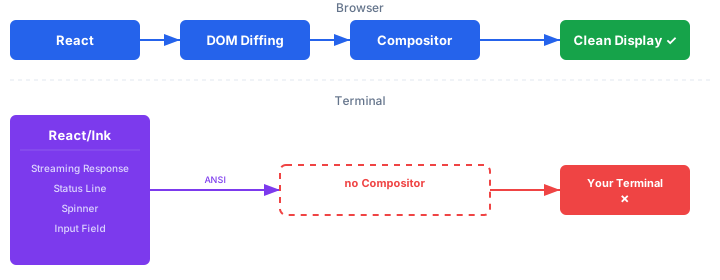
Claude Code is a React application running in the terminal. The UI is rendered with Ink, a library that translates React components into ANSI escape sequences. Instead of generating HTML elements in a browser, Ink writes control characters to the terminal stream: position the cursor, set colors, erase lines, write text.
This works well for simple tools. With Claude Code, it becomes a problem because multiple things render simultaneously:
- Streaming responses – every token triggers a render cycle
- Status line – updates several times per second (timer, token counter)
- Spinner/animations – separate render cycle during "Thinking"
- Input field – renders on every keystroke
Each of these render paths writes escape sequences to the terminal stream. When spinner, status line, and streaming response overlap, the terminal receives contradictory cursor positions. The result: lines are written to the wrong places, the screen is corrupted, and every subsequent render makes the chaos worse.
Why Doesn't Synchronized Output Help?
Synchronized Output (DEC mode 2026) is a protocol that tells the terminal: "Buffer everything between start and end sequences and display it atomically."
Claude Code already sends these sequences (\x1b[?2026h and \x1b[?2026l).
Terminals like iTerm2 and Ghostty support them.
I've been using iTerm2 for years, and I can confirm: Synchronized Output does not fix this. Synchronized Output only protects individual updates. When hundreds of uncoordinated updates per second overwrite each other, each individual update is atomic, but the overall picture is still broken. It's like a film projector showing clean individual frames, but each frame shows a different part of the scene.
Why Does Ghostty Work Anyway?
Ghostty users report no flickering, even though the argument above should apply to Ghostty as well. The likely reason: Ghostty renders using the GPU and processes escape sequences faster than CPU-based terminals. My guess: the updates don't disappear, but they're drawn so quickly that the human eye perceives no flickering. It's less "the problem is solved" and more "the problem is invisible." If you want to give Ghostty a try, go for it (I haven't tested it myself, I like my iTerm2): beyond the flicker-free rendering, it offers GPU-accelerated rendering via Metal (macOS) and OpenGL (Linux), native ligature support, the Kitty Graphics Protocol for inline images in the terminal, and over 100 built-in themes. It definitely looks slick.
Why Doesn't Anthropic Just Fix This?
Anthropic has made efforts. In version 2.0.10 (October 2025), they completely rewrote the renderer, and in late January 2026, the new "differential renderer" was rolled out to all users. Chris Lloyd, Anthropic engineer and author of the terminal rendering patches, wrote on Hacker News:
"we shipped our differential renderer to everyone today. We rewrote our rendering system from scratch and only ~1/3 of sessions see at least a flicker."
They also submitted upstream patches for Synchronized Output: the VSCode patch (xterm.js #5453) was merged, and the tmux patch (#4744) was accepted and integrated directly into OpenBSD. This improved the situation but didn't solve it.
The core problem is architectural: React in the terminal is an impedance mismatch. Two systems that work in fundamentally different ways. React assumes that rendering is cheap. In the browser, that's true: DOM diffing is fast, the browser compositor ensures flicker-free display. In the terminal, there is no compositor. Every render is a stream of escape sequences, and the terminal has no way to guarantee atomic frame updates.
Anthropic would need to completely remove React/Ink and render directly against the terminal buffer. That would be a massive rewrite of their entire UI architecture. Instead, they're betting on terminals adapting (DEC 2026, GPU rendering). Whether that bet pays off is questionable. After thousands of upvotes and almost a year, the bug is still there.
The Fix: claude-chill
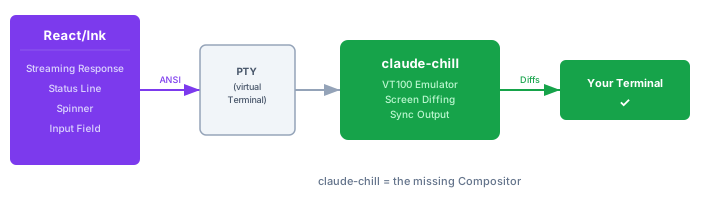
claude-chill is an open-source PTY proxy by David Beesley. It sits between your terminal and Claude Code and does exactly what Claude Code should have done itself: proper differential rendering.
How It Works
- claude-chill creates a pseudo-terminal (PTY) and spawns Claude Code inside it
- All output from Claude Code is fed through a VT100 emulator in memory
- The current screen state is compared to the previous one
- Only the actual changes (diffs) are passed through to your real terminal
- The diffs are wrapped in Synchronized Output blocks
Instead of thousands of uncontrolled redraws per second, your terminal receives only clean, atomic frame updates. claude-chill is the missing compositor that Claude Code never built.
Installation
claude-chill is compiled from source, as there are no prebuilt binaries. You'll need the Rust compiler and its package manager Cargo. If you don't have Rust installed yet, it takes about a minute to set up.
Option 1: Homebrew (macOS/Linux)
If you already use Homebrew, this is the fastest way:
brew install rust
Option 2: Official Rust installer (all platforms)
The official way via rustup.rs works on macOS, Linux, and Windows.
The script installs the Rust compiler (rustc), the package manager (cargo), and the toolchain manager (rustup):
curl --proto '=https' --tlsv1.2 -sSf https://sh.rustup.rs | sh
source ~/.cargo/env
On Windows, download the installer from rustup.rs instead of using curl.
Verify that Cargo is available:
cargo --version
If you see a version number, you're good to go.
Install claude-chill:
cargo install --git https://github.com/davidbeesley/claude-chill
Cargo downloads the source code, compiles it, and places the binary at ~/.cargo/bin/claude-chill.
The first compilation takes a bit longer as all dependencies are built from scratch.
Setup
To avoid typing claude-chill claude every time, set up an alias.
Add this line to your shell's configuration file (~/.zshrc for zsh, ~/.bashrc for bash, or the equivalent for your shell):
alias claude='claude-chill claude --'
The -- at the end is important.
It tells claude-chill that all following arguments (like --resume) should be passed through to Claude Code.
Then reload your shell:
# zsh
exec zsh

# bash
exec bash
On Windows, close and reopen the terminal instead.
From now on, claude will automatically run through claude-chill. You won't notice any difference, except that the flickering is gone.
Is claude-chill Safe?
I read the entire source code (a compact Rust project with 12 source files).
Result: the code is clean (audited at version 0.1.4, commit 2595cf7).
No network access, no filesystem writes (except optional debug logging), no sensitive environment variables read.
The dependencies are well-established Rust crates: nix for POSIX APIs, vt100 as a terminal emulator, termwiz (from the WezTerm developer) for escape sequence parsing.
The code is well-structured, thoroughly tested, and uses an explicit allowlist/blocklist for every terminal escape sequence.
A big thank you to David Beesley for this project!
Conclusion
The endless scrolling bug in Claude Code is an architectural problem: React/Ink in the terminal produces more updates than the terminal can handle. Anthropic rewrote the renderer, contributed patches to terminals, and recommends Ghostty. All of this improved the situation but didn't fix it.
claude-chill fixes it. It's a small, clean PTY proxy that takes on the role of the missing compositor. Two commands, and the bug is history.
cargo install --git https://github.com/davidbeesley/claude-chill
echo "alias claude='claude-chill claude --'" >> ~/.zshrc
Further Reading:
Keywords:Claude CodeEndless ScrollingInfinite ScrollTerminal FlickeringScreen FlickeringFlickerScroll BugScrolling BugTerminal RenderingUI FreezeHigh Speed Scrollingclaude-chillAnthropicTerminaliTerm2GhosttyVS Code TerminaltmuxPTY ProxySynchronized OutputDEC 2026
Anregungen? Feedback? Fehler?