



Static Angular SSR: Nice URLs and good SEO - you can't have both (but here's a fix!)
(Letzte Aktualisierung: )
I love Angular. But when it comes to prerendered static sites, Angular is surprisingly far behind other major frameworks. Astro, Next.js, SvelteKit: they all let you choose how your pages are written to disk. Angular doesn't.
And static sites are great: hosting is literally free, and a CDN serves your pages to the whole world and scales like a beast. That's why the websites of Angular.Schule and the Angular book are prerendered static sites.
But here comes the catch! Prerender your app, deploy it to a static host (for example GitHub Pages, Cloudflare Pages or Firebase Hosting), and take a look at the network tab: every direct visit starts with a redirect to the same URL with a trailing slash, and a moment later the Angular router quietly removes the slash again. It looks great in the address bar, but technically, for search engine optimization, it's a nightmare. You can get rid of the redirect, but only by putting a trailing slash on every URL of your site. Nice URLs or good SEO: with Angular's prerendering, you can't have both. In this article, I explain why, and how to get both today.
Update, October 2026: My pull request has been merged! 🎉 After three review rounds with Alan Agius from the Angular CLI team,
prerender.formatis now part of Angular itself and is scheduled for Angular CLI 22.3. I have to admit, I'm a little proud: a community request from 2024 that never collected enough votes is now an official option of the Angular CLI. Until 22.3 is released, the builder described below does the job.
Contents
- Today: nice URLs or good SEO, you can't have both
- Why does Angular do this?
- How do other frameworks handle this?
- With
@angular-schule/prerender-format: nice URLs and good SEO, we deserve both! - The real fix: an option in the Angular CLI
- Two things to watch out for
- Conclusion
Today: nice URLs or good SEO, you can't have both
Angular's prerendering (SSG) writes every route into its own folder.
Take the article you are reading right now: with Angular's default, the route blog/2026-09-static-angular-ssr-trailing-slash becomes blog/2026-09-static-angular-ssr-trailing-slash/index.html.
For the rest of this article, let's call it blog/my-article.
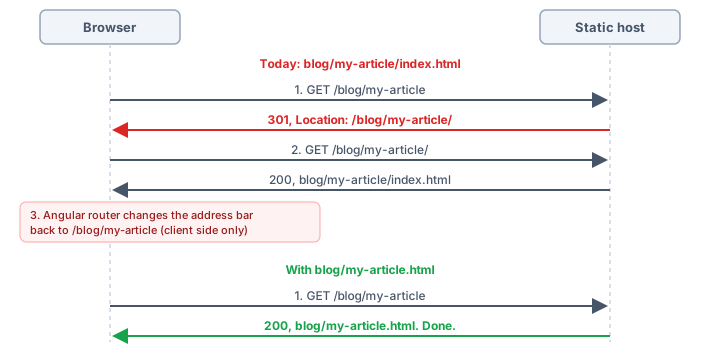
A static host like GitHub Pages or Cloudflare Pages sees a request for /blog/my-article, finds a folder with that name and redirects to /blog/my-article/.
$ curl -I https://example.com/blog/my-article
HTTP/2 301
location: https://example.com/blog/my-article/
The browser follows the redirect, gets the index.html, Angular starts, and the router normalizes the URL back to /blog/my-article.
So you have to choose:
- Nice URLs, but redirects: Your links use
/blog/my-article. Every direct visit (a search engine, a bookmark, a link shared on social media) starts with a redirect to/blog/my-article/, and the Angular router then removes the trailing slash again. The URL in your links is never the URL that actually answers. - No redirects, but trailing slashes everywhere: Your links have to use
/blog/my-article/. Pages answer directly, but every URL ends with a slash, and Angular needs an extra provider to keep it in the address bar:{ provide: LocationStrategy, useClass: TrailingSlashPathLocationStrategy }(seeTrailingSlashPathLocationStrategy).
Why does Angular do this?
The file name is decided in exactly one place in the Angular CLI, the function getRouteOutPath() in @angular/build:
function getRouteOutPath(route: string, baseHrefPathname: string): string {
  const routeWithoutBaseHref = getRouteWithoutBaseHref(route, baseHrefPathname);

  return stripLeadingSlash(posix.join(routeWithoutBaseHref, 'index.html'));
}
Every route ends up as <route>/index.html.
There is no option to change that.
This layout works on every web server, which makes it a good default.
But many static hosts can do better: they serve blog/my-article.html under /blog/my-article, directly, without a redirect.
Angular just never writes blog/my-article.html.
How do other frameworks handle this?
Static site generators have offered this choice for a long time. Angular is the odd one out:
| Framework | Option | blog/my-article/index.html |
blog/my-article.html |
|---|---|---|---|
| Astro | build.format |
'directory' (default) |
'file' |
| Next.js (static export) | trailingSlash |
true |
false (default) |
| SvelteKit | trailingSlash |
'always' |
'never' (default) |
| Nuxt 2 | generate.subFolders |
true (default) |
false |
| Hugo | uglyURLs |
false (default) |
true |
| Angular | – | always | – |
Next.js and SvelteKit even write blog/my-article.html by default.
And the Astro documentation recommends build.format: 'file' together with trailingSlash: 'never', which is the combination Angular can't produce today.
With @angular-schule/prerender-format: nice URLs and good SEO, we deserve both!
The fix is surprisingly small: write blog/my-article.html instead of blog/my-article/index.html.
Until Angular can do this on its own, the builder @angular-schule/prerender-format can do the job.
In fact, you are looking at it right now.
The Angular.Schule website is built with it, and this article is served from blog/2026-09-static-angular-ssr-trailing-slash.html.
Open the network tab and reload: no redirect, just a clean URL.
- Nice URLs:
/blog/my-article, without a trailing slash, in your links, in the address bar and in the server response alike. - Good SEO: every page answers directly. Search engines see no redirect, and the URL they crawl is the same one your links point to.
And yes, blog.html and the folder blog/ can live side by side: the host serves /blog from the file and /blog/my-article from the folder.
Installation
ng add @angular-schule/prerender-format
ng build
ng add swaps the builder of your build target and sets the new option prerender.format:
"build": {
  "builder": "@angular-schule/prerender-format:application",
  "options": {
    "outputMode": "static",
    "prerender": {
      "format": "file"
    }
  }
}
"directory"(default):/blog/my-articleis written toblog/my-article/index.html, as today."file":/blog/my-articleis written toblog/my-article.html.
I borrowed the terminology from Astro: build.format with 'directory' and 'file' became prerender.format with the same values.
All other options stay as they are, the builder passes them on to @angular/build:application.
The option is made for static builds, by design.
An ssr entry is fine as long as outputMode is "static": Angular then uses it only during ng build to prerender the pages, and no server is deployed.
If your build deploys a server ("outputMode": "server", or ssr without outputMode), the option is not considered: you get a warning, and the pages are written to <route>/index.html.
With a server, there is nothing to fix anyway: the Node.js server generated by Angular serves static files with redirect: false, so /blog/my-article is never redirected to /blog/my-article/ in the first place.
How it works
The builder calls buildApplication() from @angular/build and replaces the internal function prerenderPages() at runtime, to rename the files before they are written.
That's a hack.
It relies on internal APIs, which is why I narrowed it down to Angular 22 only.
But it's a well-tested hack: it writes the same files as my patch for the Angular CLI, and it runs on the websites of Angular.Schule and the Angular book.
I hope I don't have to maintain this package longer than necessary, and it looks good: the sustainable fix has landed in Angular.
The real fix: an option in the Angular CLI
A built-in option for the Angular CLI is the clean solution. My colleague Ferdinand Malcher opened an issue for this back in 2024: angular/angular-cli#29173, "SSG/Prerendering: Allow generating foo.html instead of foo/index.html". It didn't collect enough votes in the community voting process back then. That's a pity.
So I wrote the pull request myself: angular/angular-cli#34180 adds the same option prerender.format to Angular's own application builder, and it has been merged:
"build": {
  "builder": "@angular/build:application",
  "options": {
    "outputMode": "static",
    "prerender": {
      "format": "file"
    }
  }
}
The review took three rounds with Alan Agius from the Angular CLI team.
The biggest change: format became an object of its own in the prerender option, so it can't be combined with routesFile and discoverRoutes, which only apply to builds without outputMode.
On October 20, 2026, Alan approved and merged it, and the issue from 2024 is closed.
Thank you, Alan, for the thorough reviews and your patience!
The option is scheduled for Angular CLI 22.3.
Once your project is on that version, switch the builder name back to @angular/build:application and remove the package.
Sometimes a pull request is the best way to vote for an issue. 😉
Two things to watch out for
A route called index
With 'file', a route /index is written to index.html, the file of your start page.
A route /blog/index becomes blog/index.html, which web servers serve for /blog/.
So if you use 'file', don't call a route index.
Previewing the build locally
ng serve renders your pages on the fly and never reads the files in dist/.
To see exactly what your static host will serve (for example several locales under one origin), you need a small server for the dist folder.
If you write it with Express, watch out: with blog.html next to the folder blog/, express.static finds the folder first and redirects /blog to /blog/.
Add a small middleware in front of it that sends blog.html directly:
app.use((req, res, next) => {
  if (req.path.endsWith('/') || path.extname(req.path)) { return next(); }
  const file = path.join(distFolder, decodeURIComponent(req.path) + '.html');
  if (file.startsWith(distFolder) && fs.existsSync(file)) { return res.sendFile(file); }
  next();
});
app.use(express.static(distFolder));
Conclusion
Angular's prerendering writes every route into a folder, and static hosts answer that with a redirect to a trailing slash. Until now, you had to choose between nice URLs and a site without redirects.
We deserve both.
Write <route>.html instead of <route>/index.html, and static hosts serve your pages directly under clean URLs.
Until Angular CLI 22.3 is released, two commands are enough. ng add updates your angular.json (new builder, prerender.format: "file"), and ng build writes the files:
ng add @angular-schule/prerender-format
ng build
From Angular CLI 22.3 on, it's just one option in your angular.json: "prerender": { "format": "file" }. 🚀
Further Reading:
- angular/angular-cli#29173: SSG/Prerendering: Allow generating foo.html instead of foo/index.html
- angular/angular-cli#34180: feat(@angular/build): add
prerender.formatoption @angular-schule/prerender-formaton npm and on GitHub- Astro:
build.format - Angular: Server-side and hybrid rendering
- Angular:
TrailingSlashPathLocationStrategy
Header image: photo from pxhere (CC0), Angular logo by Google (CC BY 4.0).
Keywords:AngularAngular 22SSRSSGPrerenderingStatic Site GenerationoutputMode staticTrailing SlashRedirectSEOGitHub PagesCloudflare PagesAstro build.formatprerender.formatTrailingSlashPathLocationStrategy
Anregungen? Feedback? Fehler?
About Johannes Hoppe
 Johannes Hoppe is a trainer, consultant and developer specializing in Angular. He is a co-author of the Angular book (in German language), together with Ferdinand Malcher and Danny Koppenhagen. After four successful editions, they have rewritten the book from scratch – with modern syntax, compact and covering many new topics. The new book is out now. More info at angular-buch.com